Check profiles
Confirm lab and dev resolve to different accounts, then write the IDs
under out/ for the deploy scripts.
Before this page: Prerequisites (CLI ≥ 2.37.3).
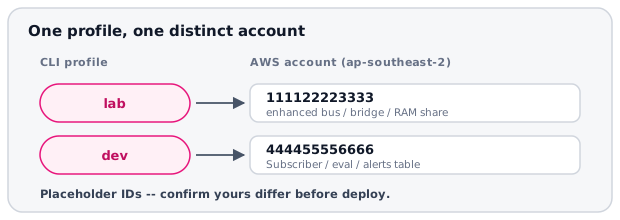
Account IDs in the diagram are placeholders. Yours will differ. lab is the same account as the existing sandbox profile.
Region
export AWS_REGION=ap-southeast-2
(no output)
Account IDs
aws sts get-caller-identity --profile lab --query Account --output text
111122223333
aws sts get-caller-identity --profile dev --query Account --output text
444455556666
Confirm they are different accounts (the share is lab → dev, so same-account defeats the point):
lab=$(aws sts get-caller-identity --profile lab --query Account --output text)
dev=$(aws sts get-caller-identity --profile dev --query Account --output text)
[ "$lab" != "$dev" ] && echo "ok: lab=$lab dev=$dev" || echo "STOP: same account $lab"
ok: lab=111122223333 dev=444455556666
Capture for scripts
AWS_PROFILE=lab ./scripts/capture-accounts.sh lab
lab account-id=111122223333 region=ap-southeast-2 profile=lab
AWS_PROFILE=dev ./scripts/capture-accounts.sh dev
dev account-id=444455556666 region=ap-southeast-2 profile=dev
cat out/lab/account-id.txt
111122223333
cat out/dev/account-id.txt
444455556666
Deploy lab reads out/dev/account-id.txt as the RAM share principal
(--principals).
If STS fails
aws sso login --profile lab
aws sso login --profile dev
Then re-run the account ID commands above.
Next: Deploy lab.